Search This Blog

Need for Speed Heat


The latest Need for Speed game is titled "Need for Speed Heat," and it was released on November 8, 2019, for Microsoft Windows, PlayStation 4, and Xbox One. The game was developed by Ghost Games and published by Electronic Arts.

In "Need for Speed Heat," players take on the role of a street racer in the fictional open-world city of Palm City. The game features both day and night racing, with players earning reputation points and money by competing in races, completing challenges, and performing stunts.

One of the key features of "Need for Speed Heat" is the "Heat" system, which represents the player's wanted level. During the day, players can participate in sanctioned races and events, but at night, they must avoid the police while participating in illegal street races and other activities. The higher the player's Heat level, the more aggressive the police response becomes.

The game also features a wide variety of customization options, allowing players to modify their cars with different paint jobs, body kits, and performance upgrades. The game features over 120 different cars from 33 manufacturers, including exotic supercars, muscle cars, and off-road vehicles.

In addition to the main story mode, "Need for Speed Heat" also includes online multiplayer, allowing players to compete against each other in races and other challenges. The game also features a companion app, allowing players to customize their cars and manage their garage from their mobile devices.

Overall, "Need for Speed Heat" has received mixed reviews from critics and players. Some have praised the game's open-world environment and extensive customization options, while others have criticized the game's repetitive gameplay and lack of innovation. However, the game remains popular among fans of the racing game genre and has sold well since its release.


Physical Storage or Cloud ?

Physical storage and cloud storage both have their advantages and disadvantages, and which one to choose depends on your specific needs and circumstances.

Physical storage refers to the use of physical devices, such as hard drives, USB drives, CDs, or DVDs, to store and access data. One of the main advantages of physical storage is that you have complete control over your data. You can physically see and touch your data, which can provide a sense of security. Additionally, physical storage can be cost-effective and easy to use, especially for small amounts of data.

However, physical storage also has some disadvantages. One major disadvantage is that it is vulnerable to damage, theft, and loss. If your physical storage device is damaged or stolen, you may lose all your data. Physical storage can also be limited in terms of storage capacity and can take up physical space, especially if you have large amounts of data.

Cloud storage, on the other hand, refers to the use of online servers to store and access data. One of the main advantages of cloud storage is that it provides easy access to your data from anywhere in the world, as long as you have an internet connection. Cloud storage can also be more secure than physical storage, as reputable cloud storage providers use advanced security measures to protect your data from theft and loss.

Cloud storage can also be more convenient and cost-effective than physical storage, especially for large amounts of data. Many cloud storage providers offer affordable pricing plans and unlimited storage capacity.

However, cloud storage also has some disadvantages. One major disadvantage is that you have to rely on a third-party provider to store and protect your data. This can be a concern if you are dealing with sensitive or confidential information. Additionally, cloud storage requires an internet connection, which can be a problem if you are in an area with poor connectivity.

Ultimately, the choice between physical storage and cloud storage depends on your specific needs and circumstances. If you need complete control over your data and have limited storage needs, physical storage may be the better option. If you need easy access to your data from anywhere in the world and have large storage needs, cloud storage may be the better option.


Best 10 Free open source video editing software

 Video editing software can be expensive, but fortunately, there are several open-source options available that can help you edit your videos without breaking the bank. Here are some of the best open-source video editing software options:


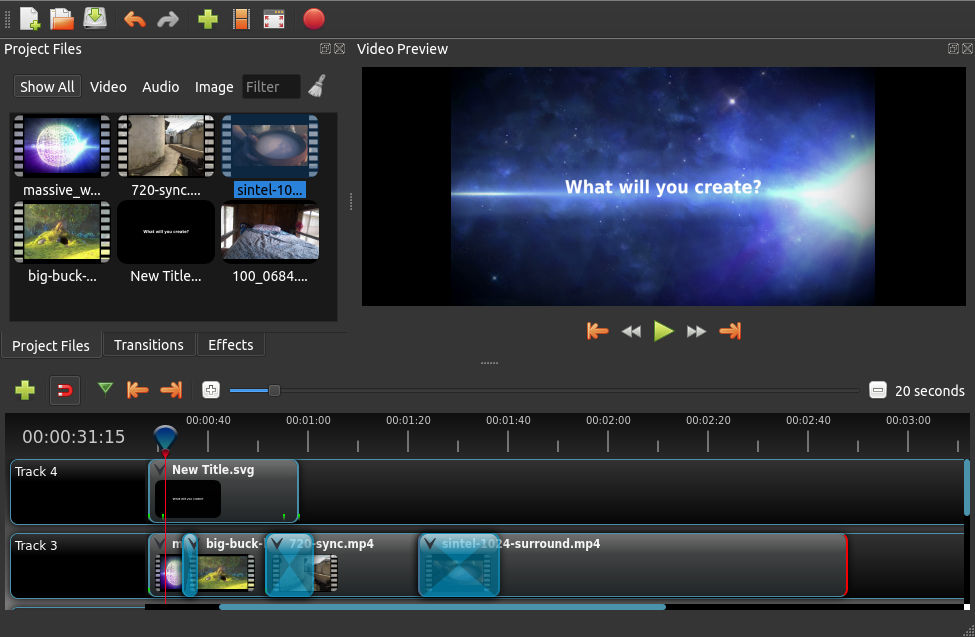
1.    OpenShot: 

OpenShot is a free, open-source video editor that is available for Windows, Mac, and Linux. It offers a simple and intuitive interface and has several features, including video and audio editing, 3D animations, and more.


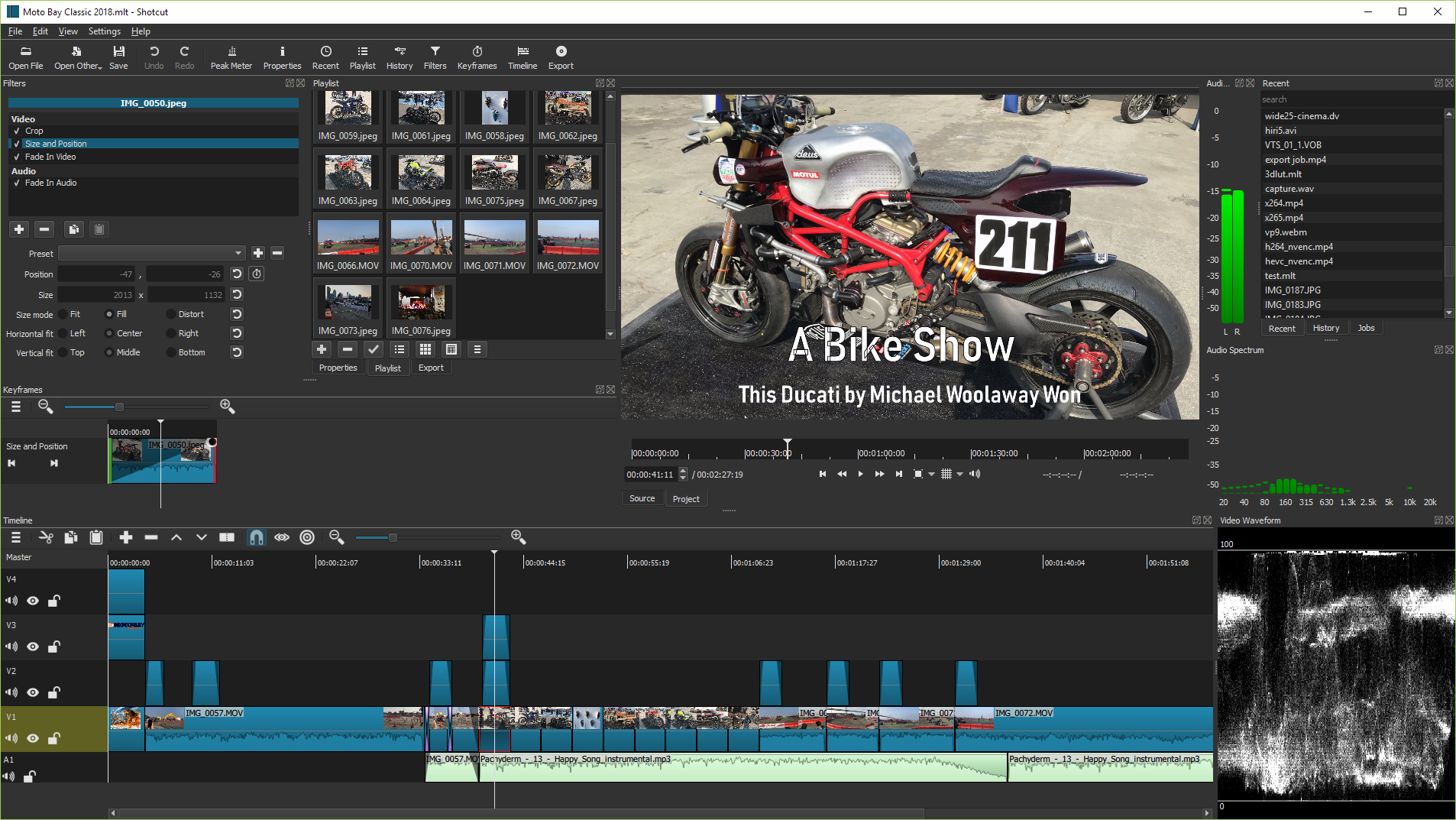
2.    Shotcut: 

Shotcut is another open-source video editor that is available for Windows, Mac, and Linux. It has a wide range of video and audio editing features and supports a variety of video formats. It also has a customizable interface and supports keyboard shortcuts for faster editing.


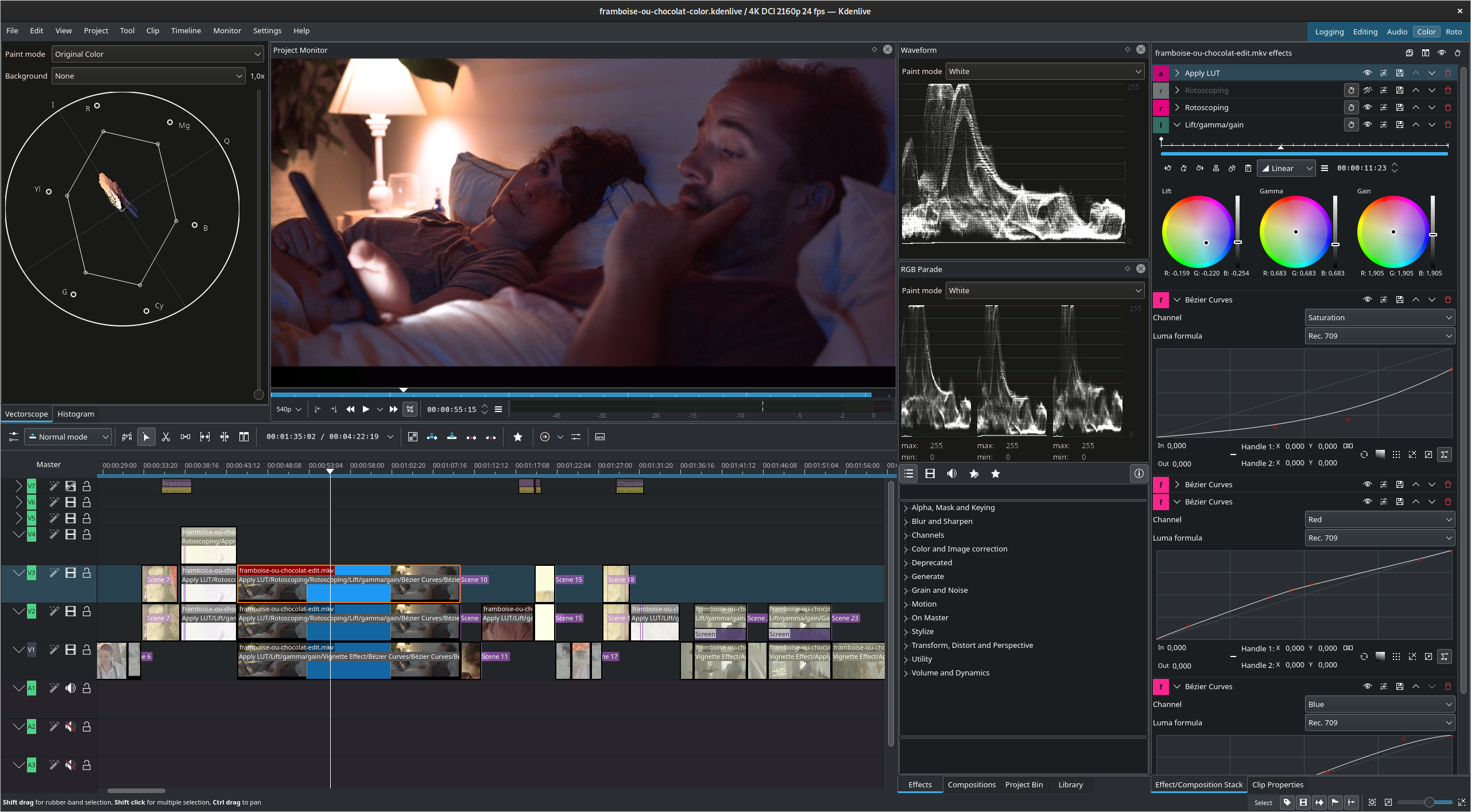
3.    Kdenlive: 

Kdenlive is a free, open-source video editor that is available for Linux, Windows, and Mac. It offers a simple and intuitive interface and has several features, including multi-track video and audio editing, color correction, and more.


4.    Blender: 

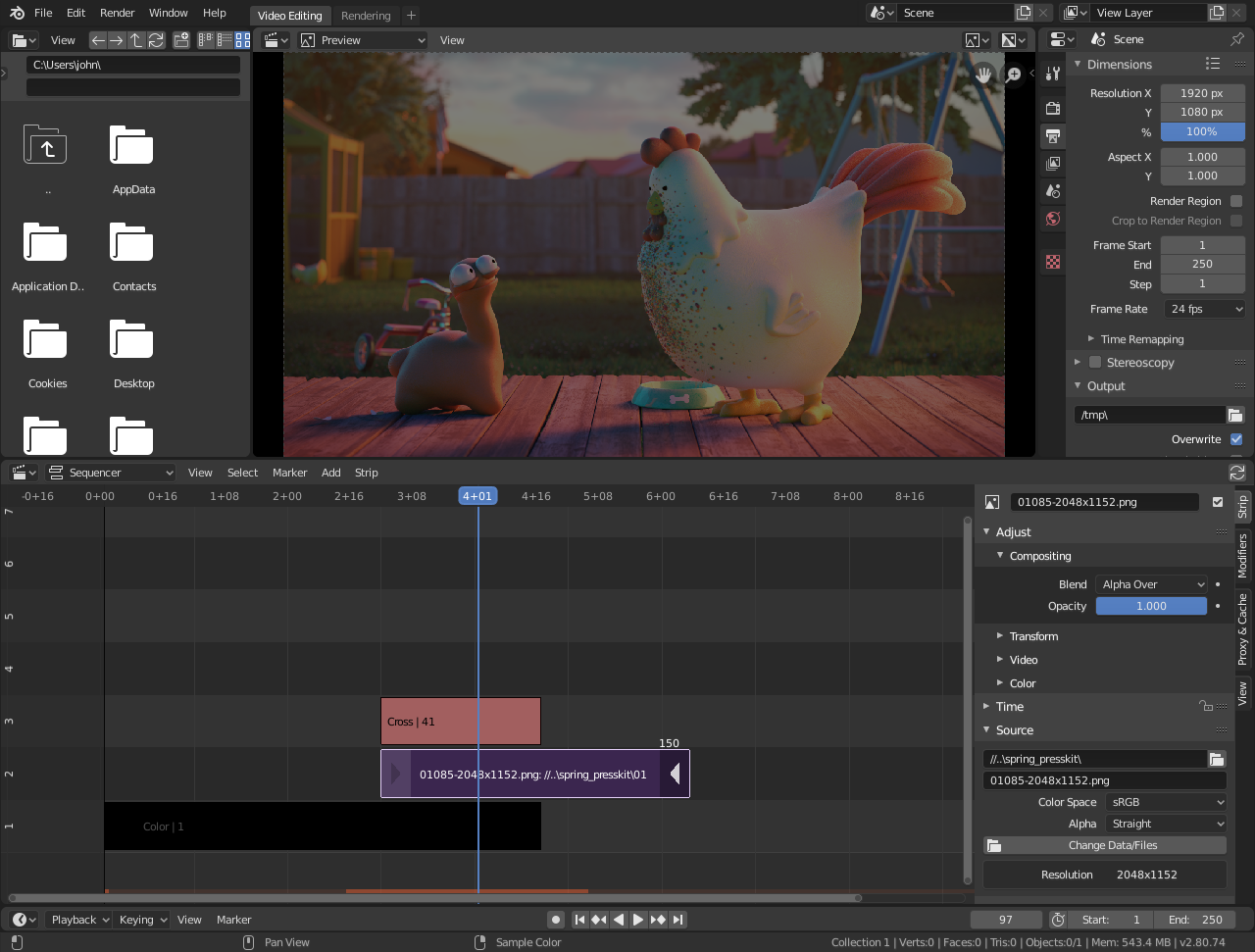
While not specifically designed as a video editor, Blender is a free, open-source 3D animation suite that also includes video editing capabilities. It is available for Windows, Mac, and Linux and has several features, including video and audio editing, visual effects, and more.


5.    Avidemux: 

Avidemux is a free, open-source video editor that is available for Windows, Mac, and Linux. It has a simple and intuitive interface and offers basic video editing features such as cutting, filtering, and encoding.


6.    Lightworks: 

Lightworks is a professional-grade video editor that is available as both a free and paid version. The free version is open-source and available for Windows, Mac, and Linux. It offers a wide range of advanced video editing features and supports high-resolution video formats.

7.    DaVinci Resolve: 

DaVinci Resolve is a professional-grade video editor that is available as both a free and paid version. The free version is open-source and available for Windows, Mac, and Linux. It offers a wide range of advanced video editing features, including color correction, visual effects, and more.

8.    Cinelerra: 

Cinelerra is a free, open-source video editor that is available for Linux. It offers advanced video editing features such as color correction, compositing, and more.

9.    Flowblade: 

Flowblade is a free, open-source video editor that is available for Linux. It offers a simple and intuitive interface and supports a wide range of video formats.

10.    Olive: 

Olive is a free, open-source video editor that is available for Windows, Mac, and Linux. It offers a simple and intuitive interface and has several features, including video and audio editing, visual effects, and more.


In conclusion, there are several open-source video editing software options available that can help you edit your videos without spending a lot of money. Each of these options has its unique features and advantages, so it's important to try out a few of them to see which one works best for you.


Why should you go for Windows 11


Windows 11 is the latest version of the Windows operating system, and it offers several new features and improvements over its predecessor, Windows 10. Here are some reasons why you might want to consider upgrading to Windows 11:


  • Improved User Interface: Windows 11 has a new user interface that is more modern and streamlined compared to Windows 10. The Start menu is now centered, and the taskbar icons have been rearranged, making it easier to find and access your favorite apps.

  • Enhanced Performance: Windows 11 is optimized for modern hardware and offers faster boot times, improved battery life, and overall better performance. It also has a new feature called Snap Layouts that allows you to quickly arrange windows on your screen, making multitasking more efficient.

  • Better Security: Windows 11 has several new security features, including Windows Hello, which uses facial recognition or fingerprint scanning to authenticate users, and virtualization-based security, which isolates critical system processes from the rest of the system to prevent malware attacks.

  • More Productivity Features: Windows 11 has several new productivity features, including a new feature called Snap Groups that allows you to save your window arrangements and restore them later, making it easier to switch between workspaces. It also has a new feature called Widgets that provides quick access to news, weather, and other information.

  • Compatibility with New Technologies: Windows 11 supports new technologies such as DirectX 12 Ultimate, which provides improved graphics performance and support for ray tracing, and Direct Storage, which improves game load times by offloading storage operations to the graphics card.

In conclusion, Windows 11 offers several new features and improvements that make it a compelling upgrade from Windows 10. However, it is important to note that not all devices may be compatible with Windows 11, and it is always recommended to check the system requirements before upgrading. Additionally, it may be wise to wait a few months after the release of a new operating system to ensure that any bugs or issues have been resolved before upgrading.


What is the Best Web Browser

choosing the best web browser depends on personal preferences and needs. There are several web browsers available in the market, including Google Chrome, Mozilla Firefox, Microsoft Edge, Safari, and Opera, among others. Each of these web browsers has its unique features, advantages, and disadvantages.

Google Chrome is the most widely used web browser globally, known for its speed, security, and ease of use. It is a popular choice for those who use Google's services, such as Gmail and Google Drive. Chrome also has a vast selection of extensions and add-ons that enhance its functionality.

Mozilla Firefox is an open-source web browser known for its privacy features, customization options, and support for various operating systems. It also has a vast selection of add-ons that can enhance its functionality.

Microsoft Edge is a web browser developed by Microsoft and is the default browser on Windows 10. It is known for its speed, security, and integration with Microsoft's services. Edge also has a feature called Collections that allows users to save web pages, images, and notes in one place.

Safari is the default web browser on Apple's macOS and iOS devices. It is known for its speed, energy efficiency, and integration with Apple's services. Safari also has features such as Reader Mode, which simplifies the layout of articles for easy reading.

Opera is a web browser that has been around for a while and is known for its speed, built-in VPN, and ad blocker. It also has a feature called Turbo Mode, which compresses web pages to reduce data usage.

In conclusion, the best web browser depends on personal preferences and needs. It is recommended to try out several web browsers to determine which one suits you best. Additionally, it is essential to keep your web browser up-to-date to ensure optimal performance and security.


What Is the Best Operating System

Choosing the best operating system depends on personal needs and preferences, as well as the intended use of the device.

There are several operating systems available in the market, including Windows, macOS, Linux, Android, and iOS. Each of these operating systems has its unique features, advantages, and disadvantages.

Windows is the most widely used operating system in the world, known for its versatility and compatibility with a wide range of devices and software applications. It is a popular choice for gamers and businesses, but it has also been criticized for its susceptibility to viruses and malware.

macOS is the operating system used exclusively on Apple's Macintosh computers. It is known for its intuitive user interface, reliability, and security. It is a popular choice for creative professionals, but it is also more expensive than other operating systems and has a smaller selection of software applications.

Linux is a free and open-source operating system that is popular among developers, programmers, and tech enthusiasts. It is known for its flexibility, security, and customization options. However, it may not be as user-friendly as other operating systems, and it may require more technical knowledge to use effectively.

Android is a mobile operating system developed by Google and is widely used on smartphones and tablets. It is known for its affordability, customization options, and compatibility with a wide range of apps. However, Android devices may have security vulnerabilities, and software updates may not be available for all devices.

iOS is the mobile operating system used exclusively on Apple's iPhones and iPads. It is known for its intuitive user interface, reliability, and security. It is a popular choice for creative professionals and business users, but it is also more expensive than other operating systems and has a smaller selection of software applications.

In summary, the best operating system depends on personal needs, preferences, and intended use of the device. Each operating system has its advantages and disadvantages, and it is up to the user to decide which one is best for them.


FREE 1 TB CLOUD

CBackup is most powerfull system which allows you to automatically back up files to Google Drive, Dropbox, OneDrive, etc. 


And you could also increase Google Drive storage space for free if you meet the Google Drive storage full error.

1. Please create an account with CBackup, and sign in to the CBackup desktop app.

2. Click the My Storage tab, select Google Drive, and press Authorize Now. Grant authority to CBackup and allow CBackup to access your Google Drive files. 


Click My Storage >select Google DriveOneDrive, or Dropbox, then click Authorize Now. Sign in to the corresponding account to grant CBackup connection with your account data. If you want to get as much storage space as possible, you can add all your Google Drive accounts, Dropbox accounts, and OneDrive accounts to CBackup.


Click the + Add Combined Cloud option under the My Storage tab.


In the pop-up window, customize the name of the combined cloud, tick all the cloud accounts you have added, and tap Next > Combine.


In this way, you could get 1 TB Storage for lifetime, Google Drive 1TB free storage space, and even unlimited cloud storage, just enjoy the 1TB cloud storage or more for free.


Enjoy your 1 TB Lifetime totally free


Official Microsoft Way to Bypass Windows 11 TPM

Realizing that a some clients will need to introduce Windows 11 on frameworks that don't meet all of its equipment necessities, Microsoft has given a vault hack that relaxes them up to some degree. Utilizing this hack, you can introduce on a framework that has essentially TPM 1.2 and has an unsupported CPU. All things considered, we suggest the contents above in light of the fact that they don't expect you to have TPM of any sort.


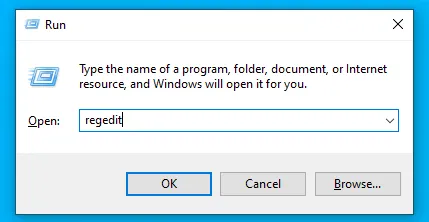
1. Open Regedit


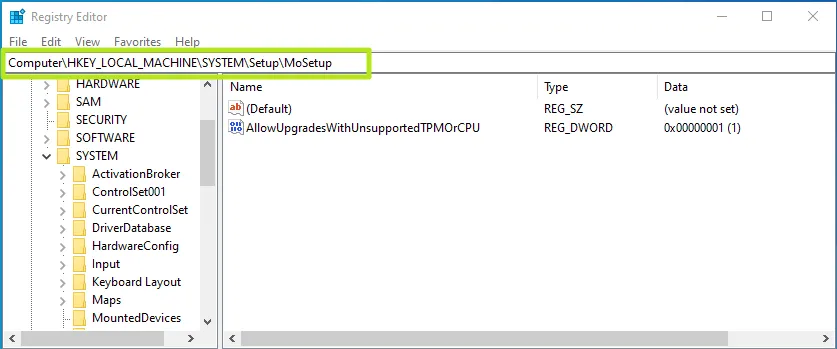
2. Navigate to HKEY_LOCAL_MACHINE\SYSTEM\Setup\MoSetup.


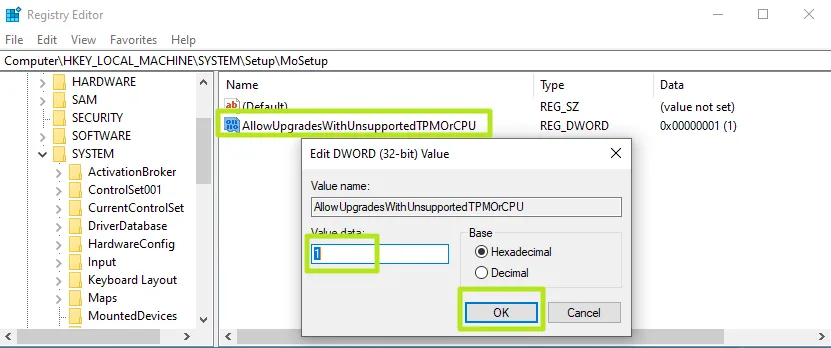
3. Create a DWORD (32-bit) Value called AllowUpgradesWithUnsupportedTPMOrCPU if it doesn't already exist.

4. Set AllowUpgradesWithUnsupportedTPMOrCPU to 1.


5. Close regedit and restart your PC. You should now be able to upgrade to Windows 11 from within Windows 10 by using installation media .


Complete guide to Bypass Windows 11 requirements


 Microsoft has some strict hardware requirements that your PC must meet to install Windows 11, including TPM 2.0 support. This is to avoid older computers and virtual machines to upgrade from Windows 10, by flashing a message that "this PC doesn't currently meet Windows 11 system requirements." 

But, there is a simple way you can create a Windows 11 USB install disk to bypass Windows 11's TPM requirement and 8GB of RAM Requirement. Using a free tool called Rufus and at least a 16GB Flash drive, you can either perform an in-place upgrade of Windows 10 to 11 or a Windows 11 clean install while getting around these minimums.

Note that Microsoft also has created an official registry hack to bypass TPM 2.0 and CPU requirements. However, this method still requires at least TPM 1.2 so, if you have no TPM at all, it's worthless. We'll talk about this at the bottom, in case you want to try it.


How to Bypass Windows 11's TPM Requirement Using Rufus

1. Download the latest version of Rufus and install it on your machine. 

2. Insert a blank 16GB or larger USB stick then open Rufus.

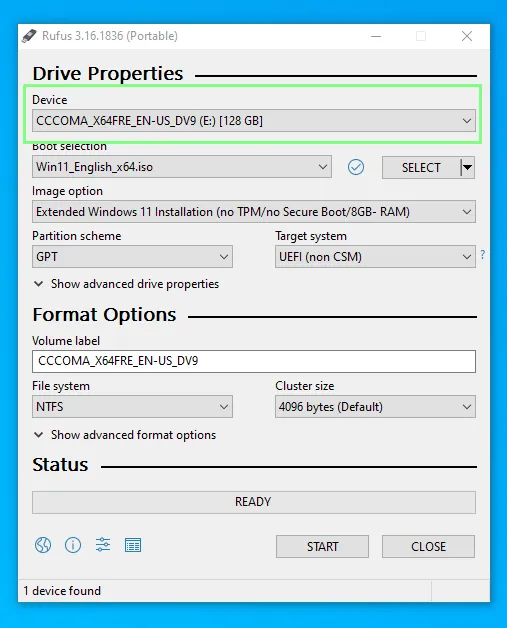
3. Select the USB device that you want to install Windows 11 to.


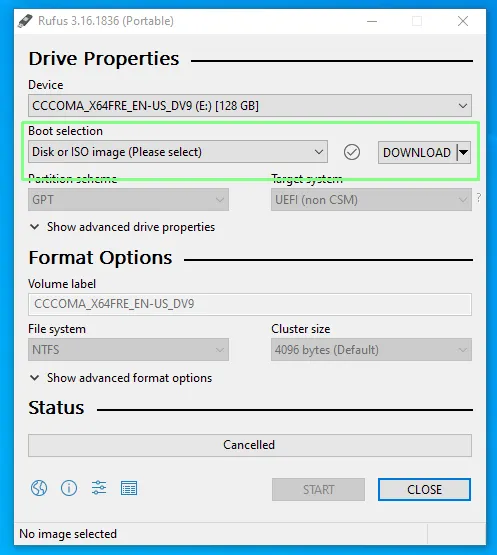
4. Ensure that Boot Selection shows “Disk or ISO image” and click DOWNLOAD.


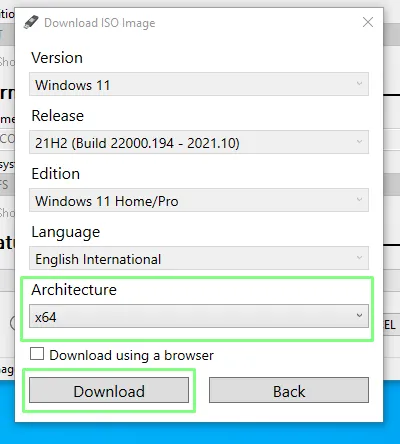
5. Select Windows 11 and click Continue.

6. Select the latest release and click Continue.

7. Select the edition and click Continue.

8. Select your preferred language and click Continue.

9. Select the architecture (most likely x64) and click Download. A new window will open asking where to save the ISO image. Save it to your Downloads folder. You can also download the image using a browser if you wish.


The download will take several minutes to complete.

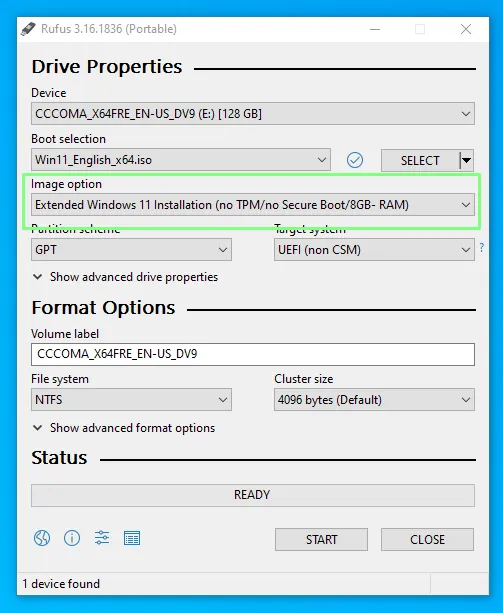
10. Click on the Image option drop down and select Extended Windows 11 Installation to disable TPM, Secure Boot and the 8GB of RAM requirement.


11. Double check that the correct drive has been selected and click on Start to begin the installation.

The write process can take some time, depending on the USB drive being used, but when done the drive can be removed and used to install Windows 11 on an older computer or even in a virtual machine.


12. Install or upgrade to Windows 11. Run setup on the USB drive, if you ware doing an in-place install from an existing Windows 10 installation.  Boot off of the drive if you are doing a clean install. Note that you may need to disable secure boot in your BIOS if it gives you a problem.

Complete Guide to Install Windows 11 Totally Free


Download windows 11 

There are three options to download windows 11.

1.  Windows 11 Installation Assistant

This is the best option for installing Windows 11 on the device you’re currently using. 


2.  Create Windows 11 Installation Media
If you want to perform a reinstall or clean install of Windows 11 on a new or used PC, use this option to download the media creation tool to make a bootable USB or DVD.

3. Download Windows 11 Disk Image (ISO)
This option is for users that want to create a bootable installation media (USB flash drive, DVD) or create a virtual machine (.ISO file) to install Windows 11. This download is a multi-edition ISO which uses your product key to unlock the correct edition.

You can easily do this using official Microsoft page.


You may have to go through simple steps to finish installation.

If your machines not supported Minimum system requirements you may flash " This PC can’t run Windows 11error message, don’t worry everything has answer. See next post for complete bypass of system requirements.


Windows 11 Minimum system Requirements

  • Processor: 1GHz or faster with two or more cores on a compatible 64-bit processor or system on a chip (SoC)
  • RAM: at least 4GB
  • Storage: at least 64GB of available storage
  • Security: TPM version 2.0, UEFI firmware, Secure Boot capable
  • Graphics card: Compatible with DirectX 12 or later, with a WDDM 2.0 driver
  • Display: High definition (720p) display, 9" or greater monitor, 8-bits per color channel

Why Flush Has 2 Buttons 😇


Modern toilet system has two flush buttons, Smaller and Bigger size. This is basically to achieve water sustainability. Let's see how it achieve.

This type called as Duel Flush system. Two type button attached to two level of water dis-engage valves. This vales operate different height of ware levels. 

Simply if you press Small button it Disengage small water content (3 to 4.5 Liter water)

If you press Big Button it Disengage Large water quantity (6 to 9 Liter Water)


So please use this buttons as per your requirements and help to save world with simple button click. 

Top Professional Video Editing Software Free Download

 1. EDIUS

Price: $499, One-Time Purchase

Pros: Renderless video editing, 4K HDR workflow, flexible user interface, real-time conversion rates, support for a wide variety of video formats, fast AVCHD editing, motion tracking, 3-way color correction.

Cons: Relatively broadcast-oriented.


2. Autodesk Smoke

Price: $190, Monthly Subscription, 1505$, Yearly Subscription

Pros: Timeline-based creative workflow, node-based compositing, ability to flawlessly make use of 3D animations and modeling, a high degree of stability (no crashes!).

Cons: Can only be used on a single monitor. Furthermore, Autodesk Smoke is exclusively for Mac users.


3. Avid Media Composer

Price: $199.99 for a Year’s Subscription, or $24.99 Monthly

Pros: Free download, Advanced color-correction, built-in metadata and effect tools, HDR support, multicam editing, FrameFlex, keyboard mapping, background rendering, real-time editing, a very high degree of stability, and serves as a great starting point for budding video editors.

Cons: Steep learning curve and outdated interface. However, learning how to use Avid Media Composer will enable you to jump right into other video editing software with ease.


4. Adobe Premiere Pro CC

Price: $31.49 Monthly Subscription, $239.88 Yearly Subscription

Pros: Highly customizable and streamlined interface, easy to use for people with past experience in Adobe products but no previous video editing experience, a large variety of tools such color matching and multi-camera rendering, and a fast rendering speed.

Cons: New updates might have a couple of bugs, so you should be a bit patient before you update if you want to keep it on the safe side. Mac users also report that it runs a bit slow on their systems.


5. Final Cut Pro

Price: $299, One-Time Purchase

Pros: Support for 360-degree VR, HDR, multi-camera editing, fast rendering speed, a large variety of interesting tools, expansive library of plugins, and easy-to-use colour correction, grading, and adjustment tools. Final Cut Pro has also been designed and optimized for Mac operating systems.

Cons: Only for Mac users. Large project files can also be slow.


Best Alternatives To Microsoft Office Suite — 2021 Edition


In the realm of office productivity software, no one has a significant presence as Microsoft Office. Redmond had produced a piece of software for just about every task necessary in the modern office, short of a few niches or specializations.


Here are the MS Office alternatives at a glance:


1. Google Docs

Google is known for its omnipresence in all things technology, there are few places Google hasn’t touched, and the office isn’t one of them. Its own set of Google Docs web apps can be used as the best alternative to Microsoft Office apps as they are available for free, and their cloud-based nature doesn’t need you to go through a tedious installation process.

Google Docs online office suite comprises of a word processor (Docs), a presentation app (Slides), a spreadsheet (Sheets). Apart from these primary office apps, Google Drawings, Forms, are also a part of the free office suite.

Google’s office suite apps can be accessed without any cost from any location on the globe; all you need is a Google account and an active internet connection.


2. Apache OpenOffice

Just like its predecessor, the Apache OpenOffice is also a free and open-source software that is available in 40+ languages and comes loaded with features. It comes with a neat and clean UI and offers a spreadsheet, word processor, presentation app, vector graphics editor, etc. However, some users may find the interface a little old school.

Speaking of the USP, this Microsoft office alternative comes with various templates, and you can expand the functionality by adding various extensions from the dedicated extensions store.


3. LibreOffice

LibreOffice was forked from OpenOffice a while back for some political reasons. Suitable for all intents and purposes, they’re more or less the same thing with the exception that the community followed the LibreOffice fork, and OpenOffice just hasn’t seen as much development since.

LibreOffice is a very feature-rich free MS Office alternative suite if you want something that installs on your computer and works without an internet connection.

In terms of cost-effectiveness, it’s pretty hard to beat. It has a few quirks, like need to change the default document formats to Microsoft Office formats. But apart from that, this free office software is an excellent choice for anyone that doesn’t require the bells and whistles of a commercial product.


4. Office Online

One reason to use Office Online is that it doesn’t introduce you to an entirely new set of office apps. It even carries the same user interface we find in MS Office 2016 or newer. Technically, Office Online is an MS Office alternative, but given the lack of its awareness among general users, it had to make to the list.

Office Online has Skype integration allowing users to chat with other people while editing a shared document or a PowerPoint presentation together. For Chrome, users can install the Office Online extension, which allows them to create and edit new files and existing files easily using Office Online.


5. Apple iWork

iWork provides many easy to use and popular features. It’s simple to use without any unnecessary fuss.

A cloud-based version called iWork for iCloud is also available. Earlier, iCloud was available only for Apple users, but now other platforms are also compatible with iWork apps because of the free office suite on iCloud. All you need is an Apple ID.


6. WPS Office

Another name that can be called out for the best Microsoft Office alternative in 2020 is WPS Office. You might have heard about Kingsoft Office in the past; it was renamed as WPS Office, which is a well-known office app for Android.

Currently, WPS Office 2020 Free version is available to the Windows users at no cost but with non-interrupting advertisements when the software starts. It includes a word processor, spreadsheet, and presentation-making applications. Regarding look and feel, WPS Office is similar to MS Office.


7. Calligra Office

Calligra Office split from KOffice in 2010, and the KOffice fizzled out shortly afterward. Calligra Office is an open source office suite built upon the Qt toolkit. It has more applications than LibreOffice, but they lack much of the features of LibreOffice.

If you want a simple office suite with a few extra applications like flowcharts, database management, and image manipulation, this free Microsoft Office replacement might be for you. Again, just like LibreOffice, if this is all you need, it’s very cost-effective.


8. DropBox Paper

For a long time, DropBox was only a place where you could store your documents. Now, with DropBox Paper, it aims to develop itself as an alternative to Microsoft Office Online and Google Docs. You can create and edit documents, collaborate with friends and colleagues, as well as enjoy many of the project management and team communication features.

Dropbox Paper has gone past its beta stage. The web-based work platform doesn’t include presentation and spreadsheet apps of its own, but it’s possible to add compatible files created using Google Docs apps or Microsoft Office files stored on your computer or Dropbox or Google Drive.
The best free PDF to Word converter 2016

The best free PDF to Word converter 2016


1. Foxyutils

Foxyutils' PDF to Word converter takes the top spot in our test for several reasons. First, it was by far the cleverest when it came to picking a font similar to that of our test document, outputting a Word file very close to the original PDF. Second, it did well with the images in our document, recognising that there was more than one and breaking them up appropriately. And third, when you use Foxyutils' tools, you contribute to the company's tree-planting efforts. Isn't that nice?


2. Nitro PDF to Word Converter

You'd be forgiven for missing the free online version of Nitro PDF to Word Converter when visiting its site, given that it's so smothered in adverts for its paid-for desktop app, but this is a perfectly competent free tool – no OCR though, sadly – suitable for occasional use. Upload your PDF, give it an email address to send the results to, and it'll transform that PDF into Word, Excel or Powerpoint files and vice versa; we wouldn't recommend using the Excel converter for mission-critical work, however.

Card Recovery Pro

Recover Photos, files and data from your memory card.


CardRecoveryPro is an easy-to-use card recovery software that can effectively recover deleted or lost photos, music, video, and multimedia files from almost all digital cards after instances like deletion, corruption and formatting, etc. Using CardRecoveryPro is safe and risk-free. The software performs read-only operations on your memory card. It doesn't move, delete, or modify the data on the card to avoid causing further damage or overwriting. It recovers the photos, music, video, and multimedia files from the source memory card and saves them to the destination location you specify in just a few steps. Simple procedure! Amazing effect!
It can help you to get your songs, karaoke, music compositions or any other lost audio file back.
Recover Photos from Formatted Card or Hard drive;
Recover your images even after you have lost them due to memory card deletion, formatting and corruption, hard drive memory or card without taking backup or creating an image of the drive.
Digital Camera Photo Recovery: Help you to recover all your lost pictures from any model of Digital Camera. And the software also supports RAW recovery of pictures from all major digital camera brands. Memory Card Recovery: Help you get your lost photos and other multimedia files back from any formatted /corrupted / damaged Internal or External storage media. Digital Photo Recovery: Recover photos/pictures from formatted or corrupted storage media as well as Video File Recovery.
If your SD card or memory card is formatted or corrupted, your important files, data or photos are lost, deleted or missing, you can just download and install Cardrecoverypro.

 Download